Senin, Desember 31

Edisi-edisi Angry bird

Hallo , maaf jarang ngepost hehehe XD yang kesempatan kali ini akan menampilkan edisi edisi game angry bird dari masa kemasa . Tapi sebelumnya taukah anda kalo angry bird telah di unduh oleh 1 miliar pengguna ( mungkin 1/7 , 1/8 penduduk bumi ) Wowww Amazing .Nah oke langsung saja saya sebutkan edisi edisi game angry bird    :

1 . Angry bird Season

Nah ini lah awal kesuksesan dari game terpopuler ini . Edisi ini dibuat pada 21 Oktober 2010 dengan episode spesial menyambut hari hallowen . Kemudian hari valentine, dan setelah itu spesial pascah , go green , santo patrick , natal 2011 , dan masih banyak lagi

2 . Angry bird Rio

Edisi kedua dari angry bird ini sesuai namanya diambil dari film animasi yang berjudul Rio pada Maret 2011 .
Didalam edisi ini , pemain tidak melawan babi jahat , melainkan monyet monyet yang yang nakal dan jahil , dan juga pada episode pertama anda akan menyelamatkan burung-burung yang terkurung di dalam kandang . Dan tentu saja edisi ini menurut saya lebih seru di bandingkan edisi sebelumnya

3 . Angry bird Space

Pada februari 2012 rovio mengumumkan edisi terbarunya yang berjudul angry bird space . Di edisi ini anda akan berhadapan melawan musuh abadi mereka tidak lain adalah babi , tapi bedanya mereka melawan babi di angkasa . Terdapat fitur baru pada edisi ini yaitu panah apabila burung ditarik

4 . Angry bird Starwars

Pada bulan november 2012 rovio resmi mengumumkan edisi terbarunya yaitu angry bird starwars . Edisi ini hampir sama dengan edisi sebelumnya tetapi ada penambahan karakter baru dan yang pastinya makin Amaziingg .

Okeee sekian saya akhiri dulu postingan ini , soalnya admin mau tahun baruan heheehheeh XD

Senin, September 24

Dasar HTML


HTML(Hyper Text Markup Language) adalah sekumpulan simbol-simbol atau tag-tag yang
dituliskan dalam sebuah file yang dimaksudkan untuk menampilkan halaman pada web
browser. Tag-tag tersebut diawali dengan<x> dan diakhiri </x> dimana x adalah tag html seperti <head> <body> <b> <i> dll

          Untuk membuat html saya menggunakan notepad ++ (cari di google banyak) dasar pada html adalah sebagai berikut :

<html>

<head>
<title>Ini adalah judul terletak pada tab</title>
</head>
<body>
<h1>Hello World</h1>
</body>
</html>
Setelah itu save , dan lihat dengan menggunakan web browser ( atau jika menggunakan notepad ++ tekan ctrl+s lalu tekan ctrl+shift+alt+s untuk Mozilla) maka hasilnya akan seperti dibawah ini :

Sekian tutorial saya kali ini , semoga bermanfaat  .

Cara Bongkar Pasang Komputer


Tujuan                  :               Siswa dapat mengenal computer,membongkar pasang/ PC
Alat dan bahan  :               Obeng , 1 Set CPU
Langkah               :               Membongkar    :
1.       Pertama siapkan obeng
2.       Buka baud dan mur yang terpasang pada casing PC , buka tutup casing
3.       Copot kabel kabel yang terpasang pada main board dan perangkat perangkat lain dengan hati hati
4.       Buka power supply pada casing ( ingat ! dahulukan power supply )
5.       Setelah itu buka komponen – komponen lainya
6.       Selesai
Merakit computer :
1.       Pasangkan kembali power supply pada casing
2.       Pasangkan kabel power ke harddisk , cdrom dan komponen komponen lainya
3.       Pasangkan dvd /cd rom , floppy disk, harddisk dan komponen lainya pada tempatnya
4.       Tutup kembali pc dengan tutup casing
5.       Selesai
Komponen komponen computer             :
Motherboard
Kabel
Processor
Casing
Floppy disk
Blower
Harddisk
Ram
Chipset
Dvdroom
Vga card
Batre cimos
Power supply
Sound card
Cooler
Heat shing
baud
Joy stick


Rabu, Agustus 1

Atomic Structure


Atoms consist of nuclei and electrons. Atomic nucleus composed / made up of protons and neutrons. The infiltration of atomic particles
Electron

Particle
Inventor
(Years)
Period
Kg
Sma
Elektron
JJ Thomson
(1897)
9,1095x10⁻³¹
5,4859x10⁻⁴
Netron
J Chawick
(1932)
1,6749x10⁻²⁷
1,0087
Proton
E Goldstein
(1886)
1,6726x10⁻²⁷
1,0073

Electrons are subatomic elementary particle which was first discovered. Electrons are found by using glass tubes which are very low pressure which is composed by:

• metal plate as an electrode at the end of the tube
• The cathode electrode to the negative pole and the anode electrode to the positive pole

Electric high pressure in the stream through a metal plate resulted in a light that flows from the cathode to the anode is called a cathode ray

The existence of a cathode ray tube to make the dark. Cathode rays are invisible to the eye but its presence was detected through a glass tube to glow due to a conflict with a glass cathode ray tube glass. The properties of cathode rays:

• cathode rays are produced due to high pressure electric current passing through the metal plate
• cathode rays went straight toward the anode
• cathode ray fluorescence effects (glow) so that its presence is detected
• cathode rays are negatively charged so that it can been turned by an electric field and magnetic field
• cathode rays are generated is independent of the material for the metal plate

The properties that support the resulting cathode ray cathode ray causes were classified as atoms and elementary particles called electrons. Joseph Johnthomson subsequently conducted a study to determine the electron charge price comparison and its time (e / m).

The results showed that cathode rays can been turned by an electric field and magnetic field. Diversion allows the measurement of the radius of curvature of the right to charge a price comparison electron and its time can be set at 1.76 x 10⁸ coulumb / gram

Robert ownership in 1909 conducted a study using electron charge determination of oil drops. Research shows that oil drops can catch as many as one or more electrons. Ownership further found that the charge on oil drops consecutive

IX (-1,6,10-19), 2x (-1,6,10-15), 3x (-1,6,10-19) and so on

Rabu, Juli 18

MIMPIKU BERSAMAMU


Disaat aku telah mengerti
dan disaat aku telah pahami
aku sadar,
dengan apa yang telah aku lalui
sekarang aku sendiri
menatap indahnya dunia
melangkah menelusuri kehidupan
disaat aku berdiri  disebuah puncak
aku pernah bermimpi suatu saat nanti,
aku ingin berdiri dipuncak ini bersamamu
tapi,,,, ,,, ,,, ,,,
itu hanyalah sebuah mimpi
mimpi yang tak terwujud
mimpi yang tak akan menjadi mungkin
yaaa,, sebuah mimpi
ketika aku dulu masih mengikuti jejakmu
masih berdiri disampingmu
dan pada kenyataannya kini
aku berdiri sendiri dipuncak ini
tanpa kamu, disampingku
tanpa kamu yang temaniku
kini,,, ,,, ,,,
telah aku relakan kepergianmu
semoga kebahagiaan selalu menyertaimu
kamu,,, ,,, ,,,
kamu yang akan menjadi bintang untukku
kamu yang akan mempunyai tempat yang special dihati ini
untuk saat ini…
by. zahrasanjaya

NOVEL TERBARU 2012 "BOLA DI ATAS MANGKUK" KARYA RINI GANEFA


NOVEL TERBARU 2012 BOLA DIATAS MANGKUK KARYA RINI GANEFA TERBITAN GRAMEDIA PANDANARAN SEGERA DI RILIS TANGGAL 20 JUNI 2012 DATANG DAN JADILAH SAKSI DARI PELUNCURAN NOVEL INI PELUNCURAN DAN BEDAH BUKU DI GELAR DI GRAMEDIA PANDANARAN LT II RABU, 20 JUNI 2012 PUKUL 14.00 DENGAN PEMBICARA : PROF. IR. EKO BUDIHARDJO, M.Sc. (Budayawan, Arsitek, dan Mantan Rektor UNDIP) MODERATOR : BAKTI YUDATAMA (RRI Semarang)

20 Signs You Suffering from Internet Addiction


20 Tanda Anda Mengalami Ketagihan Internet

20 Signs You Suffering from Internet Addiction | Internet really is a medium of dissemination of information is very important at the moment, but do you know that internet usage in the long run and may result in one continuous experience Internet addiction. Once they are addicted to internet sometimes it would not have enough sleep, if sleep unsound, the body will feel tired when waking up. Eyes felt heavy. Head felt heavy. However, when I get up, face the computer for some time, drowsiness and aches suddenly disappeared. Right?

Consciously or not, it is a symptom of Internet addiction. Here are the signs that you are already addicted to the internet that is taken from Facebook.
(1) Online surplus to requirements. Eyes were fixed on the monitor, hands on keyboard. But you know what I write.
(2) Managing the daily delayed. Glasses and dishes are not washed well organized as well as desktop computers. When I use the washing new. Not washing after use.
(3) Prioritize Internet fun than fun with friends. "Which is more fun; gather with friends, install stories, serve water and nuts, laughing and laughing together, or online?" He said, "Online."
(4) You receive only one Twitter account, Facebook, MySpace, Friendster, Hi5, Yahoo Messenger etc. On you, if you have 200 followers on your Twitter account, then it indicates that you are popular. But one you do not know!
(5) Family and friends began to criticize the amount of your Internet use. To them, it is a waste of time and electricity. On you, they are trying to take over your seat!
(6) Your examination results affected by neglected education. You said there are other reasons. Although everyone knows the Internet is the cause!
(7) Check your e-mail before starting any work. When there is an e-mail to be repaid, you will begin to stick on desktop computers. When you look at, "Ah! I'm late! "
(8) You are not productive because a lot of time wasted in front of the computer. When confronted by solid indisputable work, you say that you are busy. "You want to check e-mail again, update my blog again, I read the other blog, want to see the wall of friends again .. Where enough time! "
(9) When people ask, "Are you my long time Internet, you do what?" You replied, "There are la .." You begin to hide what you do on the Internet every day. You are worried people will lekehkan what you are doing. "Condemns the Internet means that curse me!"
(10) When you face the pressures of work or study, you say, "How lovely if there is Internet."
(11) You eagerly await when most likely you can online again. "When it I can online." "How long I do not you online?" "New je earlier. Now I cut the middle line. "
(12) Directions: Can you imagine a world without the Internet. Reaction: Tidaaaaaak! (With the roll on the floor).
(13) You feel resentful and angry when you interrupt someone online. You display a 'Do Not Disturb' when you are online. When someone close to you jengilkan face fierce eyes while giving a signal that he is complying with the sign.
(14) Sleep disturbed because online.
(15) When you are alone and not do anything, you imagine you are online and enjoy preoccupation.
(16) When someone calls while you are online you will answer, "Soon!"
(17) You are trying to reduce the time here a few times but to no avail.
(18) When people ask, "How many hours you are online every day?" You'll pretend to forget.
(19) You choose to online than out for a walk. "What are you out for a walk when I can do the same with Google Earth?"
(20) You feel tired and depressed when not online and that feeling is lost as soon as you are in front of the computer. "Bosaaaaa ... [Internet-connected suddenly cut back]"


source : http://penpatah.blogspot.com/2012/07/20-tanda-anda-mengalami-ketagihan.html
translate by : http://translate.google.com

[Share] Internet Download Manager

Internet Download Manager (IDM) is a tool to increase download speeds by up to 5 times, resume and schedule downloads. Comprehensive error recovery and resume capability will restart broken or interrupted downloads due to lost connections, network problems, computer shutdowns, or unexpected power outages. Simple graphic user interface makes IDM user friendly and easy to use.Internet Download Manager has a smart download logic accelerator that features intelligent dynamic file segmentation and safe multipart downloading technology to accelerate your downloads. Unlike other download managers and accelerators Internet Download Manager segments downloaded files dynamically during download process and reuses available connections without additional connect and login stages to achieve best acceleration performance.
Internet Download Manager supports proxy servers, ftp and http protocols, firewalls, redirects, cookies, authorization, MP3 audio and MPEG video content processing. IDM integrates seamlessly into Microsoft Internet Explorer, Netscape, MSN Explorer, AOL, Opera, Mozilla, Mozilla Firefox, Mozilla Firebird, Avant Browser, MyIE2, and all other popular browsers to automatically handle your downloads. You can also drag and drop files, or use Internet Download Manager from command line. Internet Download Manager can dial your modem at the set time, download the files you want, then hang up or even shut down your computer when it's done.

Other features include multilingual support, zip preview, download categories, scheduler pro, sounds on different events, HTTPS support, queue processor, html help and tutorial, enhanced virus protection on download completion, progressive downloading with quotas (useful for connections that use some kind of fair access policy or FAP like Direcway, Direct PC, Hughes, etc.), built-in download accelerator, and many others.
Version 6.11 adds IDM download panel for web-players that can be used to download flash videos from sites like YouTube, MySpaceTV, and Google Videos. It also features complete Windows 7 and Vista support, YouTube grabber, redeveloped scheduler, and MMS protocol support. The new version also adds improved integration for IE and IE based browsers, redesigned and enhanced download engine, the unique advanced integration into all latest browsers, improved toolbar, and a wealth of other improvements and new features.

Source : http://www.internetdownloadmanager.com/

[Share] Notepad++ 6.1.5

Notepad++ Download


Notepad++ v6.1.5 fixed bugs:

  1. Fix a html tag match freezing issue.
  2. Fix the sidebar splitter failed in Windows 8 issue.
  3. Fix un regression: folding/unfolding performance issue.
  4. Fix tab context menu in the other localization regression due to adding new command "Reload".
  5. Fix lower/UPPER case on selected text which contains NULL characters.
  6. Fix wrap/unwrap line position not being kept bug.
  7. Fix xml syntax highlighting broken because of php preprocessor instruction inside.
  8. Fix a GUI bug which shows empty tab row while closing a last tab in a row (in the multi-line tab mode).
 source : http://notepad-plus-plus.org/download/v6.1.5.html

Hardware Komputer dan Fungsinya

Hardware atau perangkat keras adalah bagian komputer yang bisa kita lihat wujud fisiknya. Hardware komputer tersusun dari komponen komponen elektronika dan mekanis yang dirakit membentuk modul-modul yang diberi nama sesuai dengan fungsinya.
Macam macam hardware komputer :
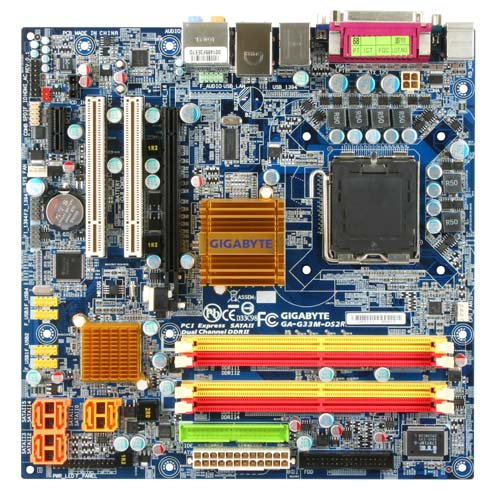
1. Mainboard atau Motherboard
motherboard adalah bagian komputer yang paling utama karena berisi sistem BIOS (Basic input output system) , pengatur koneksi input-output(chipset), soket prosessor, soket memory (RAM),  soket kartu grafis (VGA card) dan soket kartu tambahan (additional cards seperti PCI, ISA). BIOS adalah bagian utama yang mengatur sistem input output pada komputer. Bagian yang termasuk input seperti : Keyboard dan mouse. Bagian yang termasuk output seperti Monitor dan printer.
Motherboard
Motherboard
Beberapa merk motherboard yang terkenal adalah Asus, Gigabyte, Albatron, Abit, PCchips, ECS, Biostar, dan Jetway. Harga motherboard bervariasi tergantung dari merk dan spesifikasinya.
Yang perlu diperhatikan dalam memilih motherboard adalah jenis soket prosessor, Frekuensi BUS, Jumlah soket SATA dan PCI, Jumlah soket RAM dan yang paling penting adalah reputasi dan kehandalan dari sebuah merk.
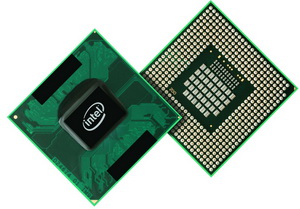
2. Processor (CPU)
Prosessor adalah otak sentral dari sebuah komputer. Prosessor adalah yang mengerjakan semua perintah yang sudah terprogram dan disimpan dalam harddisk. Dalam prosessor dikenal istilah frekuensi clock, yaitu kecepatan sebuah prosessor untuk mengerjakan perintah program dalam satu detik. Satuan frekuensi Clock dinyatakan dalam Herts (Hz).
Chip Processor
Chip Processor
Contoh sebuah prosessor intel pentium 4 dengan frekuensi clock 2 Ghz mampu mengerjakan 2 milyar perintah dalam satu detik. Dalam menyebut sebuah prosessor biasanya sudah termasuk frekuensi clocknya, contoh : intel pentium4 2.0 GHz.
Merk prosessor yang terkenal adalah INTEL dan AMD. INTEL adalah pabrik prosessor besar yang berasal dari California USA. INTEL semakin populer setelah memproduksi prosessor INTEL PENTIUM. Selain INTEL kini ada AMD yang konon lebih bagus dalam mode grafis jadi cocok untuk para Gamer.
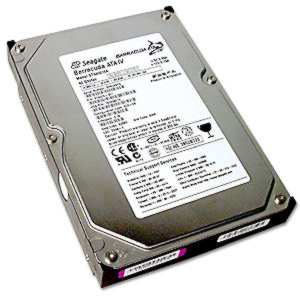
3. Harddisk (HDD)

Harddisk adalah media penyimpanan data permanen, jadi data tidak hilang meskipun listrik sudah dimatikan. Harddisk berisi sebuah cakram magnetik yang mampu menyimpan data. Ukuran harddisk dinyatakan dalam Byte (B), contoh: 160GB (160 milyar byte). Harddisk ditemukan  pertama kali oleh Reynold Johnson di tahun 1956. Harddisk pertama berukuran 4.4 MB.
Harddisk
Harddisk
Sekarang dikenal dua macam harddisk yaitu ATA dan SATA (Serial ATA). Harddisk ATA mempunyai koneksi 40 pin dan Harddisk SATA hanya mempunyai koneksi 6 pin. Harddisk SATA lebih cepat dari Harddisk ATA, namun jika motherboardnya tidak mendukung koneksi SATA maka kita tidak bisa menggunakan harddisk SATA. Sekarang ukuran Harddisk sudah sangat besar, seperti 500GB, 750GB, dan 1000GB (1 TB – Terra Byte).
Merk Harddisk yang terkenal adalah Seagate, West Digital, Maxtor, Samsung, dll. Harga hardisk tergantung dari kapasitas penyimpanan data sebuah harddisk, makin besar semakin mahal.
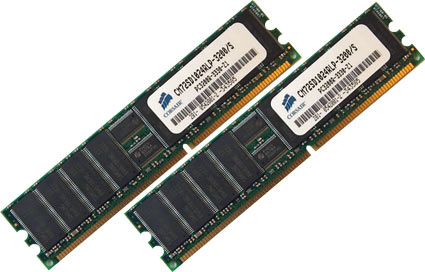
4. RAM (Random Access Memory)
RAM adalah unit penyimpan data tidak permanen artinya data dalam RAM akan hilang jika listrik mati. Ukuran data RAM dinyatakan dengan Byte (B) dan kecepatan akses RAM dinyatakan dengan Hertz (Hz). Jadi dalam RAM tidak cuma data saja, namun ada parameter lain yaitu kecepatan RAM. Kecepatan RAM harus sesuai dengan spesifikasi soket RAM pada motherboard. Contoh: RAM 512MB PC667 mempunyai ukuran data 512MB dengan kecepatan akses 667 MHz.
RAM
RAM
Keberadaan RAM dapat diibaratkan dengan meja kerja dan Harddisk diibaratkan dengan lemari arsip. Jika kita akan bekerja, pada awalnya kita ambil berkas dari lemari arsip lalu dipindah ke meja kerja supaya memudahkan dan mempercepat proses pengerjaan. Setelah selesai maka berkas tersebut kita simpan kembali di lemari arsip.
Contoh beberapa merk RAM adalah V-gen , Kingston, Visipro, Ramos, dll.
Generasi RAM dari waktu ke waktu :
  • Static RAM (SRAM)
  • Non Nolatile RAM (NV-RAM)
  • Dynamic RAM (DRAM)
  • Syncronous DRAM (SDRAM)
  • DDR RAM (Dual data rate RAM)
  • DDR II RAM (DDR generasi kedua)
  • DDR III RAM (DDR generasi ketiga)
5. Optical drive (CD / DVD)

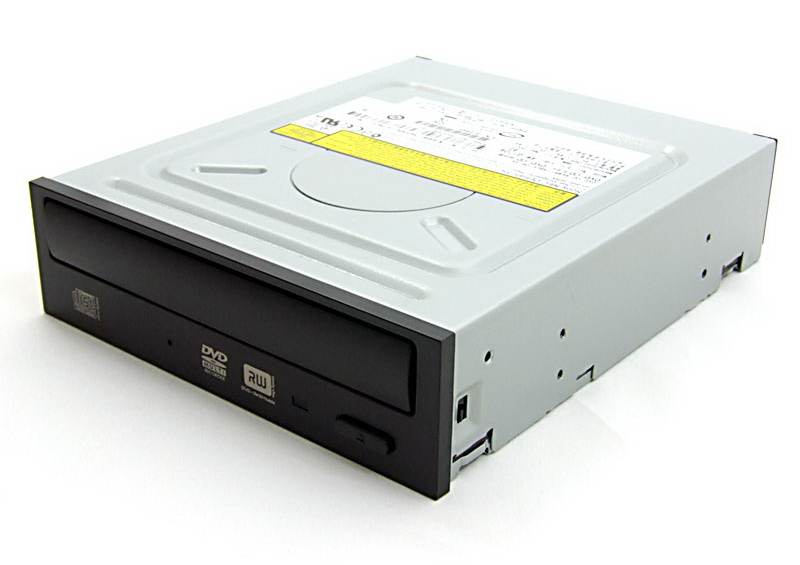
Optical Drive adalah alat pembaca untuk media penyimpan data berupa disk DVD / CD. DVD/ CD berupa kepingan cakram optik yang berisi data.
DVD RW
DVD RW
Ada dua jenis DVD atau CD :
  • DVD atau CD ROM (Read Only Memory) yaitu hanya bisa membaca isi dari disk DVD / CD
  • DVD atau CD RAM (Random Access Memory) yaitu bisa membaca ran menulis. DVD atau CD RAM lebih dikenal dengan istilah DVD-RW atau CD-RW (RW = Read Write)
Contoh Merk DVD / CD ROM atau RAM adalah LG, Samsung, Sony, Pioneer, dll.
6. Floppy Disk
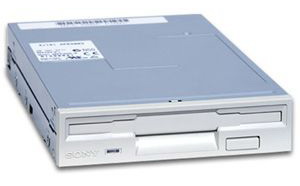
Floppy disk adalah media pembaca untuk disket.Ssaat ini mungkin disket sudah tidak populer. Namun diakui atau tidak disket turut memajukan dunia komputer selama beberapa dekade.
Floppy Drive
Floppy Drive
Disket adalah media penyimpan data portabel yang bisa dibawa-bawa. Disket terbuat dari sebuah cakram dari plastik magnetik. Ukuran disket sudah distandarkan, contoh : 1.2M, 1.44M
Dalam struktur drive pada microsoft windows, disket selalu menempati drive terhormat yaitu drive A.
7. VGA CARD (Kartu Grafis)
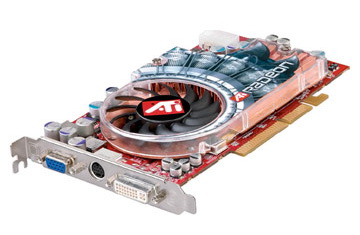
VGA adalah singkatan dari Video Graphics Array. VGA Card berfungsi mengeluarkan output grafis (gambar) untuk ditampilkan pada monitor. Ukuran VGA Card ditentukan dari ukuran RAM nya, semakin besar RAM sebuah VGA Card maka semakin halus gambar yang dihasilkan.
VGA card
VGA card
Perkembangan VGA Card dari waktu ke waktu :
  • VGA Card PCI (Peripheral Component Interconect)
  • VGA Card AGP (Accelerator Graphics Processor)
  • VGA Card PCI-E (PCI Express)
Merk VGA yang terkenal adalah ATI,  NVIDIA, S3, SIS, dan Trident.
8. Sound Card
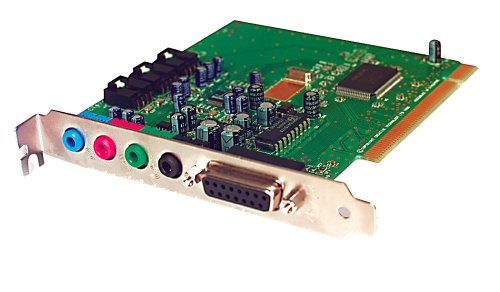
Sound Card adalah bagian yang mendekode data data digital menjadi sinyal suara. Dengan penemuan soundcard maka perkembangan dunia multimedia pada komputer menjadi makin meluas.
Sound Card
Sound Card
Sound Card yang baik mampu menghasilkan suara dengan sampling yang rapat dan halus sehingga suara yang dihasilkan mendekati suara asli / Hi Fi (Hi Fi = High Fidelity)
Contoh merk soundcard yang terkenal adalah Creative, Ess, Realtek,  Cmedia, dll.
9. Keyboard
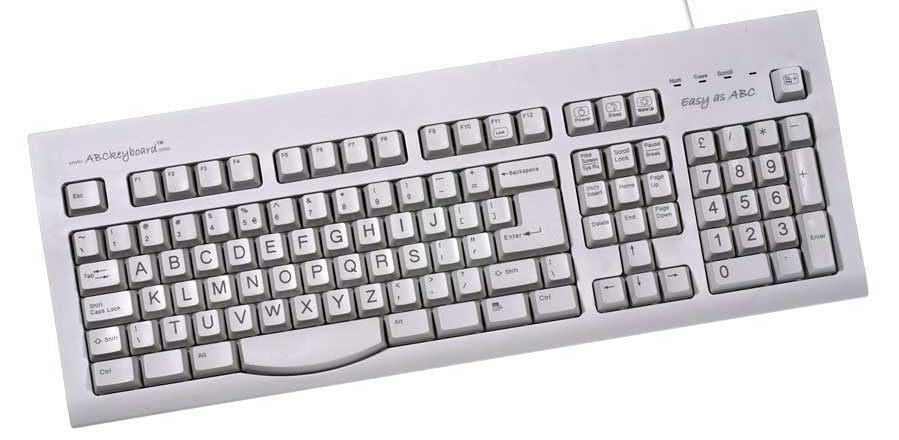
Keyboard adalah sebuah papan ketik yang berisi semua model huruf, angka, karakter dan tanda baca yang menjadi sarana bagi pengguna komputer dalam memasukkan data ke komputer.
Keyboard
Keyboard
Tombol tombol pada keyboard mengikuti model tombol pada mesin ketik manual. Tombol keyboard yang paling terkenal adalah tombol ENTER, tombol ini adalah tombol untuk memasukkan data setelah diketik.
10. Mouse (Pointing Device)
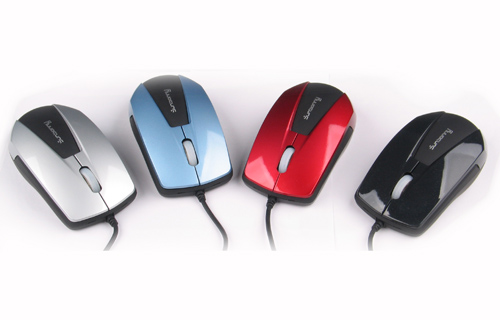
Mouse adalah sebuah alat pointer untuk mengakses melalui layar monitor.
Mouse
Mouse
Dengan mouse maka penggunaan komputer menjadi lebih interaktif dan Menggambar melalui komputer menjadi semakin mudah.
11. Monitor
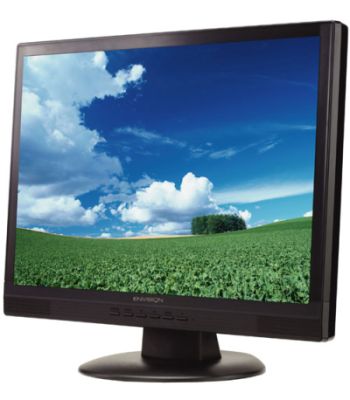
Monitor adalah media tampilan gambar haril output dari VGA Cards. Dahulu monitor komputer dimulai dengan monitor tabung hitam-putih, monitor warna CGA, VGA, dan SVGA.
LCD Monitor
LCD Monitor
Kini monitor yang sedang populer adalh monitor LCD. LCD mempunyai beberapa kelebihan, antara lain : tipis, hemat biaya dan tingkat radiasi yang rendah.
12. Printer
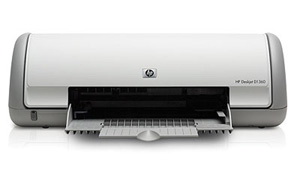
Printer adalah alat untuk mencetak hasil kerja dari komputer kedalam media kertas. Printer ada yang menggunakan sistem dot matrik, tinta dan laserjet.
Printer
Printer
Dahulu printer hanya untuk mencetak dokumen, kini printer sudah bisa untuk mencetak foto.
Merk printer yang terkenal adalah HP, Canon, Epson, dll.

sumber http://abisabrina.wordpress.com/2010/07/31/hardware-komputer-dan-fungsinya/